Installing an outdoor security light with camera isn’t just about deterring package thieves anymore. In 2026, these devices combine motion-activated floodlights, high-definition video recording, and smartphone alerts into a single hardwired or battery-powered unit that mounts where a traditional porch light used to sit. They’re the front line of home security, catching everything from late-night visitors to raccoons raiding the trash. With options ranging from budget-friendly plug-and-play models to hardwired systems tied into existing electrical boxes, there’s a security light camera that fits nearly every home’s layout and threat profile.
Table of Contents
ToggleKey Takeaways
- An outdoor security light with camera combines motion-activated floodlights, HD video recording, and smartphone alerts into a single hardwired or battery-powered fixture that deters theft and enhances home safety.
- Package theft rose 15% nationally between 2024 and 2025, making a visible security light camera a powerful deterrent since most thieves move on when they spot active recording.
- Look for essential features including 1080p minimum video resolution, adjustable motion detection zones, color night vision, and IP65/IP66 weather resistance to ensure reliable performance year-round.
- DIY installation of a hardwired outdoor security light with camera typically takes 45 to 90 minutes for homeowners with basic electrical experience, though professional help is recommended for damaged electrical boxes or complex wiring.
- Strategic placement at 8 to 10 feet high and covering entry points like front doors and garages is crucial—34% of burglaries occur through front doors, making proper camera positioning essential for maximum security coverage.
What Is an Outdoor Security Light with Camera?
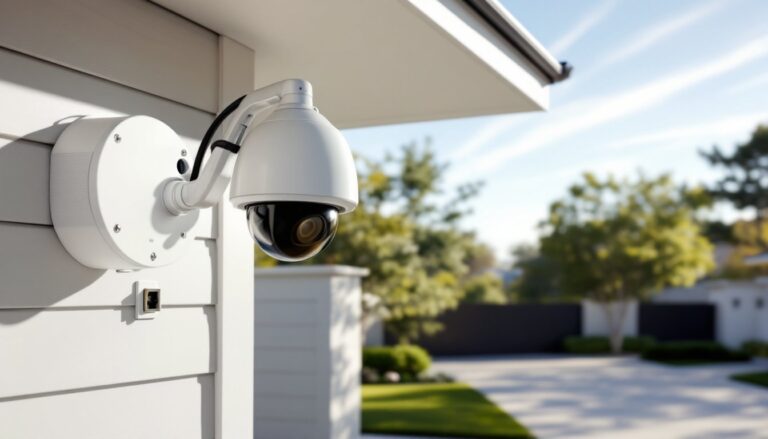
An outdoor security light with camera combines three functions: illumination, video surveillance, and motion detection. Unlike separate security cameras and floodlights, these hybrid devices integrate a camera module directly into the light fixture housing.
Most models mount to a standard outdoor electrical box using a weatherproof gasket and attach via the same wiring that powered an old porch light, typically a black (hot), white (neutral), and green or bare copper (ground) wire. Some battery-powered versions bypass wiring entirely, mounting with screws and relying on rechargeable lithium-ion packs.
The camera component usually records in 1080p or higher resolution, stores footage in the cloud or on a local microSD card, and sends motion alerts to a smartphone app. The light portion ranges from 800 to 3,000 lumens, enough to turn midnight into noon across a typical driveway or front yard.
Key components include:
- LED floodlight heads (adjustable or fixed)
- Wide-angle camera lens (typically 110° to 180° field of view)
- PIR (passive infrared) motion sensor
- Two-way audio speaker and microphone
- Wi-Fi antenna for cloud connectivity
Some units integrate with smart home ecosystems like Alexa, Google Home, or Apple HomeKit, allowing voice control and automation routines.
Why Every Homeowner Needs a Security Light Camera in 2026
Package theft jumped 15% nationally between 2024 and 2025, according to data compiled by leading smart home reviewers. A visible security light camera acts as a strong deterrent, most porch pirates move on when they spot a camera with active recording indicators.
Beyond crime prevention, these devices offer practical safety benefits. Motion-activated lighting helps homeowners navigate dark walkways, reduces trip hazards, and makes outdoor key fumbling a thing of the past. The camera footage provides evidence for insurance claims, resolves neighbor disputes, and even captures wildlife encounters worth sharing.
In 2026, improved AI-based motion detection filters out false alerts caused by swaying branches, passing cars, or neighborhood cats. Many models now distinguish between people, animals, and vehicles, sending tailored alerts so homeowners aren’t overwhelmed by notifications.
Installation and operational costs have dropped, too. Entry-level units start around $60, while premium models with advanced features top out near $300. Cloud storage subscriptions range from $3 to $10 monthly, though many cameras offer free local storage via microSD cards up to 256GB.
For homes with existing outdoor lighting on a switch, upgrading to a security light camera is often a one-hour DIY project. No need to run new wire or hire an electrician unless the electrical box is damaged or undersized.
Key Features to Look for When Choosing Your Security Light Camera
Not all security light cameras deliver the same performance. Prioritize features that match the installation site and security goals.
Motion Detection and Smart Alerts
PIR sensors detect heat signatures and movement within a defined zone, typically 20 to 40 feet from the fixture. Adjustable sensitivity settings prevent false triggers from small animals or wind-blown debris.
Look for cameras offering customizable motion zones. These let homeowners exclude high-traffic areas like sidewalks or streets, focusing alerts only on the driveway, front door, or yard. Some devices support activity zones drawn directly on the live video feed within the app.
Person detection powered by onboard AI reduces nuisance alerts. Instead of lighting up every time a car passes, the system triggers only when a human shape enters the frame. Premium models add vehicle and package detection.
Many current units offer affordable security upgrades with features like color night vision and instant push notifications. Two-way audio allows homeowners to speak through the camera, useful for greeting guests or warning off intruders without opening the door.
Video Quality and Night Vision
Minimum acceptable resolution in 2026 is 1080p (Full HD). Anything lower produces grainy footage that won’t clearly show faces or license plates. Higher-end models offer 2K or 4K resolution, which helps when digitally zooming into recorded clips.
Frame rate matters for smooth playback. Look for at least 20 frames per second (fps): 30 fps is ideal for capturing fast motion like someone running.
Night vision comes in two types:
- Infrared (IR): Black-and-white footage with decent clarity up to 30 feet. IR LEDs illuminate the scene invisibly to the human eye.
- Color night vision: Uses ambient light from streetlights or the fixture’s own LEDs to record in color. More useful for identifying clothing or vehicle color.
HDR (High Dynamic Range) helps balance bright and dark areas in the same frame, essential when recording a shadowed porch with a sunlit yard in the background.
Weather resistance is non-negotiable. Verify the unit carries an IP65 or IP66 rating, meaning it’s dust-tight and protected against water jets from any direction. Operating temperature range should cover -4°F to 122°F to handle northern winters and southern summers.
How to Install an Outdoor Security Light with Camera (DIY Guide)
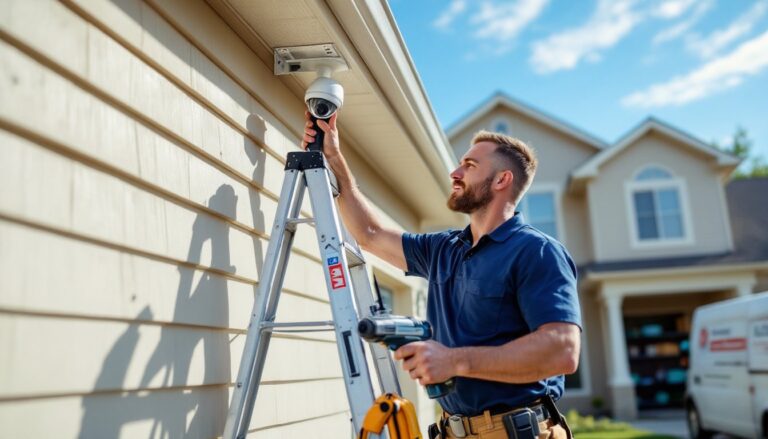
Installing a hardwired security light camera typically takes 45 to 90 minutes for a homeowner with basic electrical experience. Always shut off power at the breaker before starting. Use a non-contact voltage tester to confirm wires are dead.
Tools and materials needed:
- Non-contact voltage tester
- Phillips and flathead screwdrivers
- Wire strippers
- Wire nuts (usually included)
- Drill with bits (if mounting to new location)
- Ladder rated for your weight plus 50 lbs
- Safety glasses and work gloves
Step-by-step installation:
-
Remove the old fixture. Unscrew the mounting screws and carefully lower the old light. Disconnect wire nuts and separate the fixture wires from the house wiring. Cap the house wires temporarily with wire nuts.
-
Inspect the electrical box. Most outdoor lights mount to a standard 4-inch round or octagon box. If the box is plastic and cracked, or if it’s not securely fastened to a stud or blocking, replace it with a weatherproof metal electrical box rated for outdoor use. This may require cutting into siding, consider hiring an electrician if you’re not comfortable with that.
-
Attach the mounting bracket. Security light cameras include a mounting plate or bracket. Align it with the electrical box screw holes and secure with the provided screws. Ensure the gasket sits flush against the siding to prevent water infiltration.
-
Connect the wiring. Match wire colors: black to black (hot), white to white (neutral), green or bare copper to ground. Twist connections clockwise, then secure with wire nuts. Some cameras include a quick-connect wiring harness, follow the manufacturer’s diagram. Tuck wires neatly into the box.
-
Mount the camera fixture. Align the fixture with the mounting bracket and secure with the provided screws or twist-lock mechanism. Adjust the camera angle and light heads to cover the desired area. Most light heads pivot 180° and tilt 90°.
-
Restore power and test. Flip the breaker back on. The light should power up, and the camera will enter pairing mode (usually indicated by a blinking LED). Download the manufacturer’s app, create an account, and follow the in-app setup to connect the camera to Wi-Fi.
-
Configure settings. Set motion sensitivity, detection zones, alert schedules, and recording preferences. Test the motion sensor by walking through the coverage area.
Permit requirements: Most jurisdictions don’t require permits for replacing an existing light fixture with a like-for-like device on the same circuit. But, if running new wiring or adding a new circuit, a permit and inspection are typically required per the National Electrical Code (NEC). Check local building codes.
When to call a pro: If the existing electrical box is damaged, if there’s no box at all, or if wiring is knob-and-tube or aluminum, hire a licensed electrician. Similarly, professional camera installation might be worth the cost if running new circuits or integrating the system with whole-home automation.
Best Placement Tips for Maximum Home Security Coverage
Where you install the security light camera matters as much as which model you choose. Poor placement creates blind spots and false alerts.
Height matters. Mount the fixture 8 to 10 feet above ground. Lower than 8 feet and it’s vulnerable to tampering: higher than 10 feet and facial details get harder to capture. For two-story homes, a second camera on the upper level may be necessary.
Cover entry points first. Prioritize the front door, side gates, and garage doors. According to recent smart home research, 34% of burglars enter through the front door, and another 22% use first-floor windows. A single well-placed camera can monitor the main entrance and driveway simultaneously.
Avoid direct sunlight. Mounting a camera facing east or west causes lens flare during sunrise and sunset, washing out video. If unavoidable, look for models with HDR or glare reduction.
Respect neighbors’ privacy. Angle cameras to cover your property without recording inside neighbors’ windows or yards. Some municipalities have laws restricting surveillance of adjacent properties.
Consider Wi-Fi range. Security light cameras rely on a strong Wi-Fi signal. If the installation site is more than 50 feet from the router or separated by brick or metal siding, video may stutter or drop. Use a Wi-Fi extender or mesh network node to boost signal strength.
Overlap coverage zones. If installing multiple cameras, position them so their motion detection zones overlap slightly. This prevents gaps where someone could slip past undetected.
Test before final mounting. Hold the fixture in place (with power off) and have a helper walk through the area while you check the camera’s field of view on your phone. Adjust angle and placement before drilling final mounting holes.
Weatherproofing the mount. Apply a bead of clear silicone caulk around the mounting bracket where it meets the siding. This prevents water from seeping behind the fixture and into the electrical box. Don’t caulk the bottom edge, leave a small gap for drainage.
For added security, pair the camera with traditional motion-activated security lighting around the perimeter. Layering floodlights with cameras creates a comprehensive deterrent system that’s tough to bypass.