Standard home security cameras are great at capturing a person walking up your driveway, but try reading a license plate number from the footage and you’ll usually get nothing but a blurry smear. Whether you’re dealing with porch pirates making quick getaways, documenting parking disputes, or simply wanting a record of vehicles entering your property, a dedicated license plate camera changes the game. These specialized cameras use higher resolution sensors, tighter focal lengths, and specialized settings to capture readable plate numbers even on moving vehicles. This guide walks through what makes these cameras different, how to choose the right one, and how to install it properly, no professional installer required.
Table of Contents
ToggleKey Takeaways
- License plate security cameras use telephoto lenses, fast shutter speeds (1/2000+ second), and specialized IR illumination to capture readable plate numbers that standard security cameras cannot resolve.
- Placement is critical: mount the camera 8-12 feet high, 25-40 feet from where vehicles pass, and at a head-on angle to ensure plates occupy 10-15% of the frame for optimal clarity.
- A license plate camera requires Power over Ethernet (PoE) cabling, high bitrate recording (4-8 Mbps), and local storage (microSD or NVR) to avoid compression artifacts and internet dependency.
- Common residential uses include documenting package theft, parking disputes, hit-and-run incidents, and verifying deliveries, with manual review rather than automated recognition systems.
- DIY installation involves running outdoor-rated Cat5e/Cat6 cable through weatherproofed entry points, using stainless steel mounting hardware, and testing shutter speed adjustments at night with moving vehicles.
What Is a License Plate Security Camera?
A license plate security camera, sometimes called an LPR (License Plate Recognition) or ANPR (Automatic Number Plate Recognition) camera, is designed specifically to capture clear, readable images of vehicle license plates. Unlike general-purpose security cameras that try to cover wide areas, these units focus on a narrow field of view where vehicles pass.
The key difference is specialization. Where a standard camera might use a 1/2.8″ sensor with a wide-angle lens to cover your entire front yard, a license plate camera typically uses a 1/3″ or 1/2″ sensor paired with a telephoto lens (often 6-22mm or higher). This tighter focus allows the camera to resolve the small alphanumeric characters on a plate, even when a car is moving at 25-35 mph.
Most residential-grade models capture 1080p to 4K resolution, but resolution alone doesn’t guarantee readable plates. Frame rate, shutter speed, and infrared illumination all play crucial roles, which we’ll cover next.
Why Standard Security Cameras Can’t Capture License Plates
Standard security cameras fail at license plate capture for three main reasons: motion blur, field of view, and lighting.
First, motion blur. Most home security cameras use a shutter speed of 1/30 or 1/60 of a second to gather enough light for a clear nighttime image. But a vehicle traveling just 20 mph moves about 30 feet per second, resulting in a blurred plate. License plate cameras use shutter speeds of 1/2000 or faster, freezing motion but requiring more light (handled by powerful IR illuminators).
Second, field of view. A camera covering your entire driveway might allocate only 50-100 pixels to a license plate area. That’s not enough to resolve individual characters. A dedicated plate camera narrows its view to a 10-15 foot wide zone at the street, dedicating far more pixels to the plate itself.
Third, lighting challenges. License plates are retroreflective, they bounce light back toward the source. At night, a standard camera’s IR LED creates glare that washes out the plate. License plate cameras use 850nm or 940nm IR illuminators positioned and calibrated to minimize glare while still illuminating the characters.
Bottom line: a $200 4K security camera won’t capture plates reliably. You need purpose-built hardware.
Key Features That Make License Plate Cameras Effective
When shopping for a license plate camera, prioritize these features:
Varifocal or telephoto lens: Look for cameras with adjustable focal lengths (6-22mm, 8-32mm, or similar). This lets you dial in the exact field of view for your driveway or street distance. Fixed wide-angle lenses won’t cut it.
High frame rate with fast shutter: Cameras should support 30 fps or higher with manual shutter control down to at least 1/2000 second. This freezes motion without blur.
Powerful IR illumination: Expect 850nm IR LEDs with a range of 50-100 feet. Some models offer 940nm “invisible” IR that doesn’t produce a visible red glow, though it’s slightly less effective.
Resolution and bitrate: 1080p is adequate for most residential use, but 4MP or 5MP models provide extra detail if you’re capturing plates from farther away. Just as important: ensure the camera records at a high bitrate (4-8 Mbps minimum) to avoid compression artifacts that blur small text.
PoE (Power over Ethernet): Running a single Cat5e or Cat6 cable simplifies installation and ensures stable power and data. Battery or Wi-Fi models often struggle with the bandwidth and power demands of high-speed, high-resolution recording.
Onboard or NVR storage: Cloud-only systems can miss critical moments if your internet drops. Look for cameras with microSD slots or compatibility with a local NVR (Network Video Recorder).
Best Placement Strategies for Your License Plate Camera
Placement determines whether you capture clear plates or useless footage. Start by identifying the capture zone, the 10-15 foot section of road or driveway where vehicles will be within the camera’s optimal range.
Mounting height: Install the camera 8-12 feet above ground. Too low and you’ll get glare from headlights: too high and the angle becomes too steep to read plates clearly. A slight downward angle (10-15 degrees) is ideal.
Distance from road: Position the camera 25-40 feet from where vehicles will pass. Closer than 25 feet and fast-moving cars may blur: farther than 40 feet and you’ll need a longer lens and more IR power.
Angle of approach: Head-on or near head-on angles work best. Side angles exceeding 30 degrees distort the plate and reduce readability. If your driveway curves, mount the camera at the straightest section. For street monitoring, aim down the road so vehicles drive toward the camera as they approach.
Avoid backlighting: Don’t position the camera facing into sunrise or sunset. Bright ambient light behind a vehicle will turn the plate into a silhouette. If you can’t avoid it, use two cameras, one for each direction.
Many homeowners make the mistake of trying to cover too much with one camera. Techniques from camera placement guides emphasize focusing on key zones rather than spreading coverage too thin. One camera should monitor one lane or one direction of travel.
Installation Tips for Homeowners and DIY Enthusiasts
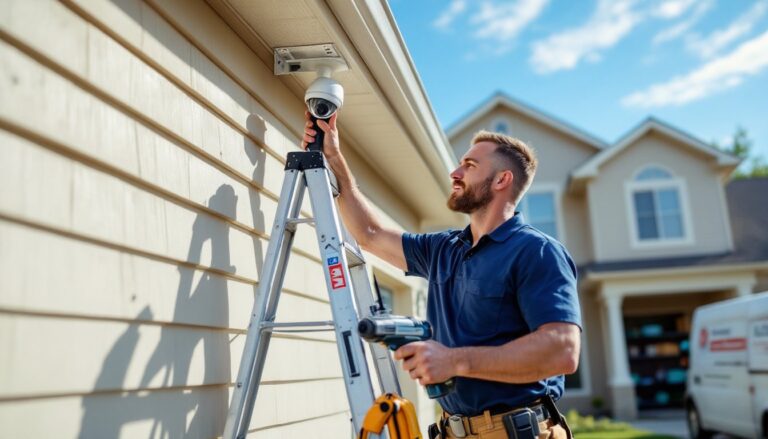
Installing a license plate camera is straightforward if you’re comfortable running cable and mounting hardware. Here’s the process:
1. Run PoE cabling: Use Cat5e or Cat6 cable (outdoor-rated if running exposed sections). Drill a hole through your exterior wall using a 1/2″ or 5/8″ spade bit, angling slightly downward to prevent water infiltration. Seal the entry point with silicone caulk. If you’re running cable through an attic or crawl space, use cable clips every 12-18 inches to secure it to joists.
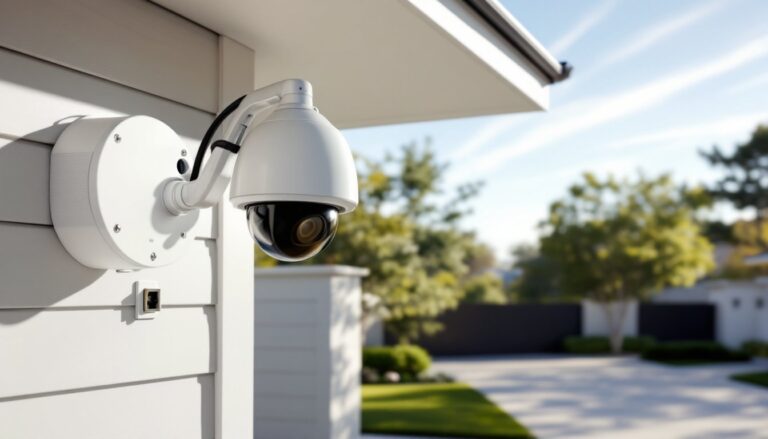
2. Mount the camera: Most license plate cameras use a junction box mount or gooseneck arm. Mark your drill holes, pre-drill with a 1/8″ bit, and use #10 stainless steel screws with plastic anchors if mounting to vinyl siding or stucco. For brick or concrete, use tapcon screws or a masonry bit with anchors.
3. Aim and focus: Connect the camera to your NVR or PoE switch and pull up the live view on a laptop. Adjust the lens to frame your capture zone, plates should occupy roughly 10-15% of the frame width. Use the camera’s focus ring (if varifocal) to sharpen the image. Test with a vehicle moving through the zone at normal speed.
4. Dial in shutter speed: Access the camera’s web interface and set the shutter to 1/2000 second or faster. The image will look dark initially, compensate by increasing gain or IR intensity. Test at night and adjust until plates are sharp without excessive noise.
5. Weatherproof connections: Use a weatherproof RJ45 coupler or drip loop to protect the Ethernet connection. Even cameras rated IP66 or IP67 can fail if moisture enters the cable jack.
Safety note: Wear safety glasses when drilling overhead, and use a sturdy ladder with a helper to stabilize it. If running cable near electrical wiring in walls, turn off power to nearby circuits and use a stud finder with wire detection.
Most systems don’t require permits since they’re low-voltage and non-structural, but always check local regulations about recording public streets. Some jurisdictions restrict camera angles that capture beyond your property line.
Top Use Cases for Residential License Plate Cameras
Homeowners install license plate cameras for several practical reasons:
Package theft documentation: Capturing the plate of a getaway vehicle gives law enforcement actionable evidence. Combine plate footage with a second overview camera for even better documentation.
Parking and easement disputes: If neighbors or delivery drivers repeatedly block your driveway or park illegally, timestamped plate footage provides proof for HOA complaints or police reports.
Hit-and-run protection: A parked car gets sideswiped on the street, plate footage identifies the responsible driver even if they don’t leave a note.
Delivery and service verification: Match license plates with scheduled contractors, delivery drivers, or service appointments. Useful if you manage a rental property or vacation home remotely.
Long-term vehicle monitoring: Some homeowners track patterns, who parks on the street overnight, how often certain vehicles appear. This isn’t about paranoia: it’s about knowing what’s normal for your block.
Keep in mind that while many home security systems now include cloud-based AI features, license plate recognition at the consumer level is still a manual process, you’re capturing clear images, not running automated plate lookups. That’s generally a good thing, since automated recognition systems often require subscriptions and raise privacy concerns.
If you live on a busy street, expect to capture dozens or hundreds of plates daily. Most users set up motion-triggered recording zones and review footage only when needed, rather than combing through hours of video.
Conclusion
A license plate camera isn’t overkill, it’s a focused tool that does one job exceptionally well. Pair it with your existing security system for comprehensive property coverage, and you’ll have the documentation you need when it counts. Just remember: aim carefully, focus tightly, and test with real-world vehicle speeds before calling the install done.