Grainy footage won’t cut it when you need to identify a license plate, read a document, or confirm who accessed your loading dock at 2 a.m. That’s where 4K security camera systems come in, delivering resolution sharp enough to capture details that 1080p systems miss entirely. For business owners, the stakes are higher than residential setups: you’re protecting inventory, employees, liability concerns, and operational continuity. This guide walks through the top 4K camera systems designed for small to medium businesses, covering what matters most, image quality, storage demands, installation realities, and total cost of ownership.
Table of Contents
ToggleKey Takeaways
- 4K security camera systems deliver four times the pixel density of 1080p HD, enabling clear identification of faces, license plates, and documents essential for incident resolution and insurance claims.
- A best 4K security camera system for business should include PoE connectivity, AI-powered motion analytics, IP66+ weather resistance, and H.265 compression to balance image quality with manageable storage demands.
- Businesses can expect first-year costs ranging from $1,000–$2,500 for DIY installation or $3,000–$7,000 with professional setup, plus optional cloud storage fees of $960–$2,880 annually.
- Professional installation is recommended for multi-story buildings, high-mounted cameras, integration with existing security infrastructure, or when compliance documentation with NEC Article 725 is required.
- Local NVR storage with RAID configuration and 30-day retention (mandated for compliance industries) provides cost-effective continuous recording, while hybrid setups combining local and cloud storage offer redundancy and remote accessibility.
Why 4K Resolution Matters for Business Security
4K resolution (3840 × 2160 pixels) delivers roughly four times the pixel density of standard 1080p HD. In practical terms, that means you can digitally zoom into footage without turning faces into pixelated blurs, critical when law enforcement needs a clear image or you’re reviewing an incident for insurance claims.
For businesses, the advantage extends beyond facial recognition. Product labels, cash register displays, vehicle plates at 50+ feet, and fine print on documents all become legible. If someone disputes a delivery or claims damage occurred on-site, 4K footage provides evidence that holds up under scrutiny.
There’s a trade-off: 4K files are large. A single camera recording at 4K/30fps can generate 6–8 GB per hour depending on compression (H.265 vs. H.264). That impacts storage costs and network bandwidth, especially if you’re running eight cameras continuously. But for high-risk areas, entryways, cash handling zones, loading docks, the clarity justifies the overhead. According to recent smart home security analysis, businesses upgrading to 4K report 40% faster incident resolution compared to legacy 1080p systems.
Key Features to Look for in a Business Security Camera System
Not all 4K systems are built the same. Here’s what separates commercial-grade setups from consumer models rebadged for business use:
Image Sensor & Low-Light Performance
Look for cameras with larger sensors (1/1.8″ or better) and starlight technology or infrared (IR) night vision rated to at least 100 feet. Many break-ins happen after hours, and poor low-light performance renders 4K resolution useless in dim conditions.
PoE (Power over Ethernet)
Wired PoE cameras pull power and data through a single Cat5e or Cat6 cable, eliminating the need to run separate electrical lines. This simplifies home security cameras installation and reduces points of failure. PoE+ (IEEE 802.3at) supports cameras with pan-tilt-zoom (PTZ) functions and built-in heaters for outdoor use.
Weather Resistance (IP Rating)
Outdoor cameras should carry at least an IP66 or IP67 rating, indicating dust-tight construction and protection against heavy rain or hose-directed water. If your region sees extreme temps, check the operating range, many commercial cameras function from -40°F to 140°F.
Analytics & Motion Detection
Modern NVRs (network video recorders) and cameras offer AI-driven analytics: human/vehicle detection, line crossing alerts, loitering detection, and facial recognition. These reduce false alarms triggered by animals, wind-blown debris, or passing headlights.
Remote Access & Mobile Apps
You’ll want real-time viewing and playback from a smartphone or laptop, plus push notifications for motion events. Confirm the system supports ONVIF (Open Network Video Interface Forum) standards, which ensure compatibility across brands and prevent vendor lock-in.
Scalability
Small businesses often start with 4–8 cameras but expand over time. Choose an NVR with unused channels (e.g., an 8-channel NVR if you’re installing 4 cameras now) and verify the system supports daisy-chaining or network expansion without replacing core hardware.
Top 4K Security Camera Systems for Small to Medium Businesses
Here are proven setups that balance image quality, reliability, and total cost:
Reolink RLK16-800B8 (16-Channel PoE System)
This kit includes an NVR with 3 TB storage and eight 4K PoE bullet cameras. The cameras deliver solid color night vision up to 100 feet using built-in spotlights (no IR needed), which also acts as a visual deterrent. The system supports H.265+ compression, cutting file sizes roughly in half compared to H.264 without noticeable quality loss. It’s plug-and-play: cameras auto-detect when connected to the NVR’s PoE ports. Best for retail storefronts, small warehouses, or multi-tenant offices. Street price: ~$900–$1,100.
Lorex 4K IP Camera System (8-Channel NVR)
Lorex offers a robust 8-camera package with smart motion detection that distinguishes between people and vehicles. The included NVR has a 2 TB HDD (expandable to 10 TB) and supports remote viewing via the Lorex Cloud app, no monthly fees for basic remote access, though cloud storage is subscription-based. Cameras are metal-housed with IP67 ratings and Color Night Vision (warm LED illumination up to 135 feet). Ideal for outdoor lots, loading zones, or facilities with mixed indoor/outdoor coverage. Runs $800–$950.
Hikvision DS-7608NI-K2/8P with 8MP Cameras
A step up in the commercial tier, Hikvision’s NVR supports up to 8 PoE cameras with built-in analytics: intrusion detection, face detection, and heat mapping. The 8MP (4K) cameras use DarkFighter technology for exceptional low-light performance without supplemental lighting. Storage starts at 2 TB but supports dual SATA bays for RAID configurations. The system integrates with access control and alarm systems via API, making it suitable for offices with existing security infrastructure. Note: Hikvision gear may require professional configuration and firmware updates for compliance in certain jurisdictions. Expect $1,200–$1,600 for a full kit.
Amcrest 4K NVR (16-Channel with 4 Cameras)
Amcrest’s scalable system starts with four 8MP PoE cameras and a 16-channel NVR preloaded with a 3 TB drive. Cameras support 98-foot night vision and include motorized varifocal lenses (2.7–13.5mm), letting you adjust the field of view without climbing a ladder. The mobile app is straightforward, and the NVR works with third-party ONVIF cameras if you want to mix brands later. A solid entry point for businesses planning phased rollouts. Price: ~$700–$850.
Professional testing from independent tech reviewers consistently ranks these systems among the most reliable for long-term commercial deployment.
Installation Considerations: DIY vs. Professional Setup
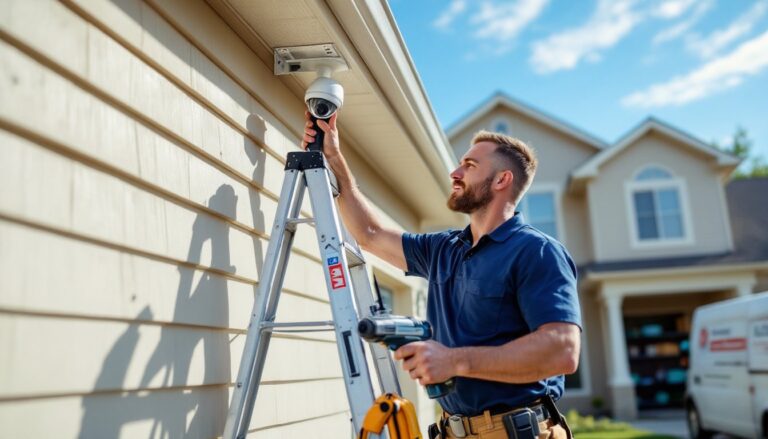
DIY installation is viable for most PoE systems if you’re comfortable running cable and drilling exterior mounting holes. You’ll need:
- Cat5e or Cat6 cable (solid copper, not CCA, copper-clad aluminum causes voltage drop over distance)
- A PoE injector or PoE switch if your NVR doesn’t have built-in PoE ports
- Drill, masonry bits (for brick/concrete), fish tape or rods for wall fishing
- Weatherproof junction boxes for outdoor cable terminations
- Ladder, cable staples, and patience
Typical install time: 6–10 hours for a 4-camera system if wiring is exposed (drop ceiling, surface conduit). Double that for concealed runs through walls or attics.
When to hire a pro:
- Multi-story buildings where cable routing crosses fire-rated walls or requires conduit compliance with local codes
- High-mounted cameras (20+ feet) needing bucket trucks or scaffolding
- Integration with alarm systems, access control, or VMS (video management software) platforms
- Liability concerns: commercial properties often need documentation that installation meets NEC Article 725 (low-voltage wiring) and local building codes. Licensed installers provide that paper trail.
Professional installation for an 8-camera system typically runs $800–$2,000 depending on complexity, travel distance, and whether they’re also terminating patch panels or installing network switches. Get at least two quotes and confirm they’re insured and familiar with PoE systems, some alarm companies subcontract camera work to techs who specialize in wireless residential setups and lack experience with commercial-grade IP cameras.
Storage Solutions and Cloud vs. Local Recording
Local storage (NVR with built-in HDDs) is the default for most business systems. A 4 TB drive can retain roughly 10–14 days of continuous 4K footage from eight cameras using H.265 compression. If you only record on motion, that extends to 30–60 days. For compliance-heavy industries (healthcare, finance), plan for 30-day retention minimum, often mandated by regulations.
NVRs support RAID configurations (mirrored drives) for redundancy, critical if a single drive failure could mean losing weeks of footage. Budget systems use single drives: enterprise models like Hikvision’s support dual bays for RAID 1.
Cloud storage offers off-site backup and remote access without port-forwarding headaches, but monthly fees add up. Typical pricing: $10–$30 per camera/month for continuous recording, less for event-only uploads. For eight cameras, that’s $960–$2,880/year. Cloud makes sense if:
- Your business lacks on-site IT support to manage NVR firmware updates and backups
- You need footage accessible from multiple locations (franchise owners, property managers)
- Physical security is a concern (thieves can steal an NVR: cloud footage remains safe)
Hybrid setups are increasingly common: local NVR for 24/7 recording, cloud sync for critical cameras or event clips. Some systems, like those reviewed on connected home tech platforms, now offer AI-driven event tagging, making cloud-stored incidents easier to search and retrieve.
Cost Analysis: What to Budget for Your 4K System
Here’s a realistic breakdown for a small business (4–8 cameras):
Equipment (DIY install):
- 8-camera 4K PoE system with NVR: $700–$1,600
- Additional cabling/mounting hardware: $100–$200
- PoE switch (if needed): $80–$150
- Total: $880–$1,950
Professional Installation:
- Labor for 8 cameras: $800–$2,000
- Conduit/outdoor-rated cable upgrades: $150–$400
- Network configuration (static IPs, VLANs): $100–$300
- Total: $1,050–$2,700
Ongoing Costs:
- Cloud storage (optional): $0–$2,880/year
- NVR hard drive replacement (every 3–5 years): $80–$200
- Maintenance/firmware updates (DIY or contract): $0–$500/year
Hidden costs to watch:
- Network bandwidth: Streaming 4K to mobile devices can saturate slow upload connections. Budget for business internet with at least 10 Mbps upload per remote viewer.
- Permits: Some municipalities require permits for commercial camera installations, especially exterior-facing cameras recording public sidewalks or neighboring properties. Fees range from $50–$300.
Businesses seeking affordable entry points often explore options through security camera discounts during seasonal sales, though verifying warranty terms and return policies is essential.
Total first-year cost (DIY): ~$1,000–$2,500
Total first-year cost (professional install with cloud): ~$3,000–$7,000
Prices fluctuate with market conditions and regional labor rates. Always get itemized quotes.
Conclusion
Upgrading to a 4K security camera system isn’t just about sharper images, it’s about actionable evidence, reduced liability, and peace of mind when you’re off-site. The systems covered here offer proven reliability for small to medium businesses without enterprise-level budgets. Whether you tackle installation yourself or bring in a pro, prioritize features that match your specific risks: low-light performance for after-hours monitoring, ample storage for retention compliance, and analytics to cut through noise. Measure twice, mount once, and don’t skimp on quality cable, your footage is only as good as the infrastructure behind it.