Netgear security cameras, particularly the Arlo product line, have become a staple for homeowners looking to monitor their property without running cable through walls or hiring an electrician. Unlike hardwired systems that require drilling, fishing wire, and sometimes a permit for low-voltage work, Netgear’s wireless approach simplifies installation. But ease of setup doesn’t mean you can skip the planning. Camera placement, Wi-Fi coverage, and weatherproofing still matter. This guide walks through why Netgear (now branded primarily as Arlo) stands out, which models fit different use cases, and how to install and configure them for reliable performance.
Table of Contents
ToggleKey Takeaways
- Netgear security cameras (Arlo) eliminate the need for hardwired installation, permits, and electricians, making them ideal for DIY homeowners seeking wireless monitoring solutions.
- Pro models offer 2K resolution and color night vision for detailed identification, while Essential series cameras prioritize extended battery life (up to one year) and lower costs for basic monitoring needs.
- Successful installation requires strong Wi-Fi coverage (at least three bars), strategic placement 8–9 feet high with overlapping camera zones, and proper weatherproofing to prevent water damage.
- Motion sensitivity and activity zones should be fine-tuned to minimize false alerts from passing traffic or wind, significantly extending battery life and improving alert reliability.
- Netgear security camera systems integrate seamlessly with Alexa, Google Assistant, and Apple HomeKit, enabling automated routines like motion-triggered lighting or smart lock unlocking for deliveries.
- Local storage via a base station and USB drive provides privacy-focused recording without cloud subscriptions, though Arlo Secure subscriptions offer smart detection and extended cloud storage.
Why Choose Netgear Security Cameras for Your Home
Netgear spun off its Arlo camera division in 2018, but the brand remains synonymous with wireless security. The core appeal is simple: no need for line-voltage wiring, which means no permits in most jurisdictions (check local codes, some areas regulate low-voltage security systems). You’re working with rechargeable batteries or solar panels, not 120V circuits.
Weather resistance is another draw. Most Arlo models carry an IP65 rating, meaning they handle rain, dust, and temperatures from -4°F to 113°F. That makes them suitable for eaves, soffits, or fence posts without additional enclosures. Just avoid mounting directly in sprinkler spray or full sun for extended battery life.
The wireless connectivity relies on Wi-Fi (2.4 GHz for range, 5 GHz for bandwidth on newer models). You’ll need a router with decent outdoor coverage or a mesh extender if your camera location is more than 50 feet from your access point. Netgear’s base stations, included with some bundles, act as hubs, offloading storage and processing from your home network.
Smart home integration works natively with Amazon Alexa, Google Assistant, Apple HomeKit (on select models), and IFTTT. You can trigger lights, lock doors, or sound alarms based on motion events. For DIYers already running smart switches or thermostats, this ecosystem compatibility eliminates the need for a separate monitoring service, though Arlo does offer cloud storage subscriptions for extended recording.
One caveat: battery life ranges from two to six months depending on usage. High-traffic areas with frequent motion triggers drain power faster. Plan for either regular recharging or adding solar panels (more on that in the installation section).
Top Netgear Security Camera Models Compared
Arlo’s lineup spans budget-friendly essentials to 4K feature-packed pro models. Choosing the right one depends on your resolution needs, power budget, and whether you’re monitoring a front porch or a sprawling backyard.
Arlo Pro Series
The Pro 4 and Pro 5 are the workhorses. Both shoot 2K video (2560×1440), doubling the pixel count of 1080p for clearer license plate or face recognition at 15–20 feet. The Pro 5 adds a wider 160° field of view versus the Pro 4’s 160°, plus a built-in spotlight that auto-triggers in low light.
Wire-free or wired: You can run them on battery or connect a weatherproof magnetic charging cable for continuous power. If you’ve got an outdoor outlet under an eave, the wired option eliminates recharge downtime. The cable threads through a grommet in the mount, no exposed connections.
Color night vision is standard. The integrated spotlight illuminates up to 25 feet, letting the camera capture full-color footage instead of grayscale infrared. It’s useful for identifying clothing or vehicle color in security events. Independent tests on platforms like Tom’s Guide have praised this feature for forensic clarity.
Two-way audio uses a built-in mic and speaker. Audio quality is clear enough for delivery instructions or scaring off porch pirates, though there’s a half-second lag typical of Wi-Fi cameras.
Smart detection (requires Arlo Secure subscription) distinguishes people, vehicles, packages, and animals. You can set zones to ignore sidewalk foot traffic but alert on driveway motion. This cuts down false alerts from passing cars or neighborhood cats.
Arlo Essential Series
The Essential Spotlight Camera and Essential XL trade resolution and features for longer battery life and lower cost. Both record 1080p video, adequate for general monitoring but less useful for fine detail beyond 12 feet.
Integrated spotlight and siren are built in. The 1000-lumen spotlight is brighter than the Pro series, doubling as a motion-activated porch light. The siren tops out at 80 decibels, enough to startle but not as loud as a dedicated alarm.
Battery life on the Essential XL stretches to one year with typical use (10–15 motion events daily). The larger battery pack adds a few ounces but eliminates the monthly recharge chore. For remote installations, a detached garage or shed, this is the practical choice.
Direct Wi-Fi connection means no base station required. The camera joins your network like any other device. That simplifies setup but puts more load on your router. If you’re running a dozen smart devices already, consider a dedicated 2.4 GHz SSID for cameras to avoid bandwidth fights.
No optical zoom: The Essential series uses digital zoom, which crops and enlarges the image. Expect pixelation beyond 2x. If you need to monitor a long driveway, step up to the Pro models.
For budget-conscious homeowners, the Essential series delivers core monitoring without subscription fees for local recording (via base station) or live view. Check for security camera discounts during seasonal sales, bundles often include a base station or solar panel at no extra cost.
How to Install Your Netgear Security Camera System
Installation is straightforward, but placement and prep determine whether your camera works reliably or becomes a twice-weekly recharge headache.
Tools and materials:
- Drill/driver with masonry or wood bits (depending on mounting surface)
- Phillips head screwdriver for the mount screws (included)
- Level (a 6-inch torpedo level works fine)
- Pencil for marking holes
- Ladder (most installs are 8–10 feet up under eaves)
- Voltage tester if running wired power near existing fixtures
- Weatherproof silicone sealant for screw holes in wood siding
Safety first: Wear safety glasses when drilling overhead. Masonry bits kick up dust, consider a dust mask. If working above 6 feet, use a stabilized ladder on level ground.
Step-by-step installation:
-
Map your coverage areas. Walk your property and note blind spots. Cameras should overlap fields of view, front corners of a house typically need two cameras to avoid dead zones near the door. Avoid pointing cameras at reflective surfaces (windows, metal siding) that trigger false motion alerts.
-
Check Wi-Fi signal strength. Download Arlo’s app and use the built-in signal meter before mounting. You need at least three bars for stable streaming. If signal is weak, add a mesh extender or reposition your router. Running an outdoor-rated Ethernet cable to a weatherproof access point is another option, check local codes for burial depth if trenching across a yard.
-
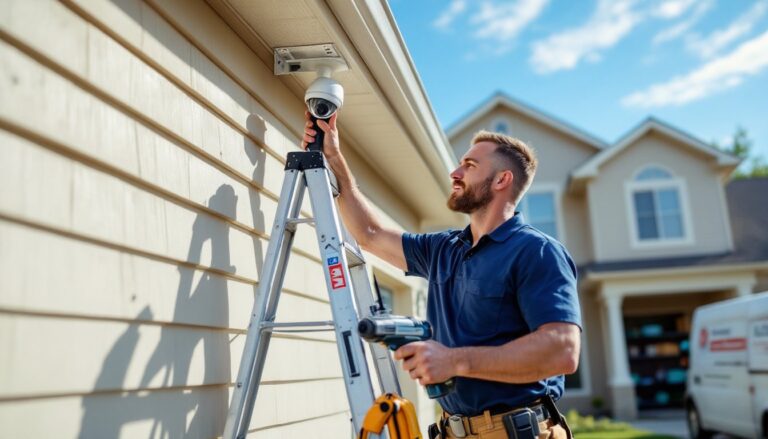
Mount the bracket. Arlo cameras use a magnetic ball-and-socket mount. The bracket screws into wood, vinyl siding, or masonry. For wood or vinyl, use the included screws. For brick or stucco, drill a 3/16-inch pilot hole, tap in a plastic anchor, then drive the screw. Seal screw holes with silicone to prevent water intrusion behind siding.
-
Attach the camera. The magnetic mount snaps on with a satisfying click. Adjust the angle, most installs aim down at a 15–20° angle to capture faces, not the tops of heads. Use your level to avoid a crooked image (it’s more annoying than you’d think).
-
Power options. For battery operation, charge the battery fully before install (2–3 hours via USB-C). For wired power, thread the charging cable through the mount’s cable channel and plug into an outdoor outlet. Use a GFCI-protected outlet, required by NEC Article 210.8 for outdoor receptacles. If adding a new outlet, that’s electrical work requiring a permit in most areas: hire a licensed electrician unless you’re comfortable with romex and code compliance.
-
Add solar panels (optional). Arlo’s solar panel mounts separately and connects via a weatherproof cable. Position it to get 3–4 hours of direct sunlight daily, south-facing in the Northern Hemisphere. The panel trickle-charges the battery, extending runtime indefinitely in sunny climates. In overcast regions (Pacific Northwest, anyone?), expect the panel to reduce recharge frequency rather than eliminate it.
-
Configure in the app. Follow the in-app prompts to connect each camera to your Wi-Fi. Name cameras by location (“Front Porch,” “Driveway”) for quick reference. Set motion zones to exclude high-traffic areas like sidewalks. Enable smart notifications if you’ve subscribed to Arlo Secure.
Common mistake: mounting too high. Above 10 feet, facial detail drops off fast. Aim for 8–9 feet, high enough to deter tampering but low enough for clear ID shots. For detailed guidance on placement and wiring, see resources on home security cameras installation.
Maximizing Your Netgear Camera’s Features and Performance
Out-of-the-box settings work, but tweaking a few options extends battery life, cuts false alerts, and improves footage quality.
Motion sensitivity: Default is set high, triggering on tree branches or distant cars. Dial it down one notch at a time until you’re catching people but ignoring wind-blown shrubs. Activity zones let you draw boxes around driveways or walkways, ignoring the street beyond. This is critical for homes on busy roads.
Recording length: Cameras default to 10-second clips. Extend to 30 seconds if you want full context (say, watching someone walk to a door, knock, and leave). Longer clips drain battery faster, balance coverage with runtime.
Scheduling: Set cameras to disarm when you’re home. Most families don’t need driveway alerts during weekends when cars are coming and going all day. The app’s geofencing feature auto-arms when your phone leaves a set radius, handy if you forget to toggle modes.
Firmware updates: Arlo pushes updates for bug fixes and feature adds. Enable auto-updates in settings. Cameras offline during updates (usually 3–5 minutes), so schedule them during low-traffic hours.
Storage options: Free plans include rolling 30-day cloud storage for up to five cameras. Arlo Secure subscriptions add 60-day storage, smart detection, and e911 integration. For those avoiding monthly fees, a base station with a USB drive (FAT32 formatted, up to 2TB) records locally. Pull the drive to review footage, no cloud required. According to reviews on CNET, local storage appeals to privacy-focused users avoiding third-party servers.
Battery care: Lithium-ion batteries degrade faster in extreme temps. If your camera sits in full Arizona sun or Minnesota winter, expect shorter lifespan. In freezing conditions, battery capacity drops temporarily, a full charge might last weeks instead of months. Solar panels mitigate this by topping off daily.
Cleaning: Wipe the lens quarterly with a microfiber cloth. Dust, pollen, and spiderwebs degrade image quality and can trigger false motion alerts (thanks, bugs). Check mounts for loose screws, wind vibration works them free over time.
Integration tips: Link cameras to smart lights via IFTTT or Alexa routines. Example: motion at the front door triggers porch lights and unlocks a smart lock for deliveries. Or set a Google Assistant routine to display the camera feed on a Nest Hub when someone rings the doorbell. Tech enthusiasts on Digital Trends frequently highlight these automation workflows for layered security.
Conclusion
Netgear’s Arlo cameras deliver reliable wireless monitoring without the complexity of hardwired systems. Choose Pro models for resolution and features, Essentials for battery life and budget. Install with attention to Wi-Fi coverage, weatherproofing, and practical mounting height. Tweak settings to balance performance and battery drain, and integrate with smart home routines for a security system that works with your daily life, not against it.