LiveWatch positions itself as a middle-ground home security option, DIY-friendly enough for homeowners who can handle basic installations, but backed by professional monitoring. The company offers wireless equipment and 24/7 monitoring without the aggressive contracts that plague legacy systems. But does it deliver enough value to justify the monthly cost, and can the average DIYer actually handle the setup? This review breaks down LiveWatch’s equipment, pricing, installation requirements, and how it stacks up against competitors in a crowded market.
Table of Contents
ToggleKey Takeaways
- LiveWatch home security combines DIY wireless installation with 24/7 professional monitoring, making it ideal for homeowners who want expert backup without expensive technician visits.
- Installation typically takes 2–3 hours for a standard three-bedroom home using basic tools, with equipment costs ranging from $200–$600 and monitoring plans between $30–$50/month.
- LiveWatch’s Z-Wave compatibility allows integration with smart locks, thermostats, and lights from a single control panel, setting it apart from basic DIY competitors like Ring Alarm.
- Cellular backup ensures your LiveWatch home security system stays connected during internet outages, using LTE failover to maintain continuous monitoring coverage.
- Contract terms are more flexible than legacy providers like ADT, but early termination fees typically run 75% of remaining contract value—a significant drawback for renters or those planning to relocate.
- Wireless equipment requires battery replacements every 3–5 years, and adhesive-mounted sensors can fail on unprepared surfaces, so proper maintenance and installation prep are critical to system reliability.
What Is LiveWatch Home Security?
LiveWatch is a wireless home security provider that combines self-installed equipment with professional monitoring services. The system runs on cellular and broadband connections, eliminating the need for landlines, a must in 2026, when most households have ditched traditional phone service.
The company ships pre-programmed equipment directly to homeowners. No drilling through studs or running low-voltage wire through walls unless you’re adding hardwired sensors. Core components include door/window sensors, motion detectors, a control panel, and optional cameras. Everything communicates wirelessly with the base station, which connects to LiveWatch’s monitoring center.
Unlike pure DIY systems that let you self-monitor through an app, LiveWatch requires a professional monitoring contract. That means someone’s watching your system 24/7, ready to dispatch help when an alarm trips. It’s not a plug-and-play, cancel-anytime setup, expect a service agreement, though terms are more flexible than the 36-month locks some competitors demand.
The target user is a homeowner comfortable mounting sensors with adhesive strips or screws and following illustrated instructions, but who wants the backup of a monitoring service. If you’ve installed smart home devices or hung shelving with a level, you’re likely qualified.
Key Features and Equipment Options
LiveWatch’s equipment lineup covers the basics and a few extras. Standard packages include:
- Control panel with touchscreen: Wall-mounted (or countertop via stand). Acts as the system brain and user interface.
- Door/window sensors: Magnetic contact sensors. Mount with adhesive or #6 screws if you want permanence.
- Motion detectors: Passive infrared (PIR) sensors with pet immunity up to 40 pounds. Useful if you have a Corgi but not a Great Dane.
- Glass break sensors: Audio-based detectors that listen for the frequency of breaking glass. One sensor can cover multiple windows in a single room.
- Key fobs and panic buttons: Wireless remotes for arming/disarming or triggering emergency alerts.
- Indoor/outdoor cameras: HD video with cloud storage. Night vision and two-way audio are standard on most models.
- Environmental sensors: Smoke, carbon monoxide, and water leak detectors integrate with the system and trigger monitoring center alerts.
All equipment is Z-Wave compatible, meaning you can layer in smart home features like door locks, thermostats, and lights. The control panel doubles as a hub, though integration quality varies by device brand.
DIY Installation vs. Professional Setup
LiveWatch defaults to DIY installation. Equipment arrives pre-paired to your account: you mount sensors, plug in the panel, and test each zone via the touchscreen menu. The process is similar to assembling flat-pack furniture, follow the manual, use a level, and don’t skip the test phase.
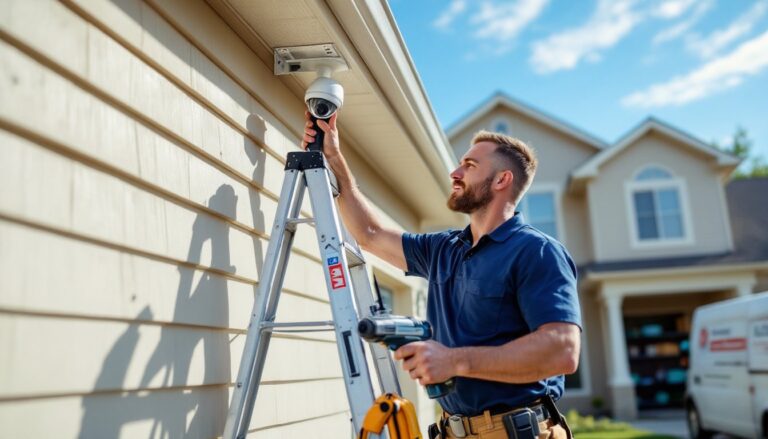
Typical install for a three-bedroom home (10–12 sensors, one panel, one motion detector) takes 2–3 hours. You’ll need:
- Cordless drill/driver (if screwing into trim or drywall)
- Level (even adhesive-mounted sensors should sit straight)
- Ladder (for ceiling-mounted smoke detectors or high window sensors)
- Smartphone (for setup app and Wi-Fi configuration)
Professional installation is available for an added fee, usually $100–$200 depending on system size. Worth it if you’re uncomfortable working on a ladder, have a multi-story home, or want cameras mounted under eaves where you’d need to drill through fiber cement siding.
One caution: Adhesive mounts fail on textured or dirty surfaces. Wipe down trim with isopropyl alcohol before applying sensors. If you have old latex paint that’s flaking, screw-mount or repaint first. Most DIY complaints stem from sensors falling off within weeks because prep was skipped.
Pricing and Monitoring Plans
LiveWatch operates on a monthly monitoring fee plus upfront equipment cost model. As of early 2026, expect:
- Equipment packages: $200–$600 depending on the number of sensors and cameras. Some promotions bundle starter kits for under $300.
- Monitoring plans: $30–$50/month. Base plans include 24/7 professional monitoring, cellular backup, and mobile app access. Higher tiers add video storage (30–60 days), smart home automation, and environmental monitoring.
Contracts typically run 36 months, though month-to-month options exist at a premium (roughly $10/month extra). Early termination fees apply, often 75% of remaining contract value. Not ideal if you’re flipping a house or renting short-term.
Compare that to budget smart home security platforms that charge $10–$20/month but offer self-monitoring only. LiveWatch’s pricing sits between those and legacy providers like ADT Home Security, which often require $1,000+ upfront and $50+/month with tighter contracts.
Regional pricing notes: Equipment costs are consistent nationwide, but monitoring fees can include local taxes and service surcharges. Always confirm the out-the-door monthly total before signing. Installation labor (if you go pro) varies, urban markets charge more than rural.
Pros and Cons for Homeowners
Pros:
- Wireless installation: No fishing wire through walls or hiring an electrician. Most sensors run on CR123A or AA batteries with 3–5 year life.
- Cellular backup: If your broadband drops, the system stays connected via LTE failover. Critical during power outages if you have a battery backup on the panel.
- Professional monitoring: Someone calls the cops or fire department when you can’t. Useful if you travel or work long hours.
- Z-Wave integration: Control locks and lights from the same panel. Saves you from juggling multiple apps.
- Pet-friendly motion sensors: The 40-pound threshold works for most dogs and cats without constant false alarms.
Cons:
- Contract lock-in: Even “flexible” plans often penalize early exits. Not ideal for renters or those planning to move.
- Higher cost than pure DIY: Wyze Home Security or Ring Alarm offer similar hardware for half the monthly fee, if you’re willing to self-monitor.
- Mixed customer service reviews: Response times and tech support quality vary. According to a CNET review, some users report frustration with billing issues and slow equipment replacements.
- Limited camera quality: HD video is standard, but resolution and app responsiveness lag behind dedicated camera brands like Arlo or Nest.
- Battery maintenance: Wireless = battery swaps every few years. Mark your calendar or risk a dead sensor when you need it most.
Bottom line: LiveWatch fits homeowners who want professional monitoring without a hardwired system, are comfortable with basic mounting tasks, and plan to stay put long enough to ride out the contract.
How LiveWatch Compares to Other DIY Security Systems
LiveWatch vs. SimpliSafe:
SimpleSafe offers similar wireless equipment and DIY setup, with no-contract monitoring at $18–$28/month. Equipment costs are comparable, but SimpliSafe’s app and camera integration often score higher in user reviews. LiveWatch edges ahead on Z-Wave compatibility if you want deeper smart home control.
LiveWatch vs. Ring Alarm:
Ring Alarm costs less upfront ($200–$300 for a base system) and offers optional monitoring at $20/month, no contract. Ring’s ecosystem integrates tightly with Amazon Alexa and their video doorbells. LiveWatch provides more robust professional monitoring and environmental sensors as standard. Ring is better for tech-savvy users: LiveWatch for those who want a traditional security company backing them.
LiveWatch vs. ADT/Brinks:
Legacy providers like Brinks Home Security and ADT typically require professional installation and charge $40–$60/month with 36-month contracts. They offer better local service networks and faster dispatch partnerships. LiveWatch undercuts them on equipment cost and gives DIYers control, but lacks the brand recognition and service maturity. If you value a local technician showing up same-day, stick with the legacy names. If you’d rather save $500 on install and don’t mind troubleshooting via phone support, LiveWatch is viable.
LiveWatch vs. Xfinity/Cable Bundles:
Some homeowners bundle security with internet through providers like Xfinity Home Security. This works if you’re already a customer and want one bill. Downside: you’re locked to that ISP, and equipment often isn’t portable if you switch providers. LiveWatch is carrier-agnostic and stays with you if you move (within their service area).
A Tom’s Guide review notes LiveWatch’s equipment is solid but not cutting-edge, and customer support can be hit-or-miss depending on when you call.
Conclusion
LiveWatch bridges the gap between bargain-bin DIY systems and high-cost professional installs. It’s a good fit for homeowners who can handle basic mounting and setup but want 24/7 monitoring without paying for a truck roll. The wireless design keeps install time under three hours for most homes, and cellular backup ensures coverage even when Wi-Fi drops. Just weigh the contract terms carefully, budget for battery replacements, and confirm your local monitoring response before committing.