Smart home security doesn’t require a second mortgage or a contractor on speed dial. Logitech’s security camera lineup offers homeowners a middle ground between big-box basic models and enterprise-grade systems that cost more than a used sedan. Whether monitoring a front porch or keeping tabs on a backyard workshop, these cameras integrate with existing smart home ecosystems without requiring an IT degree. This guide walks through what sets Logitech apart, which model fits specific needs, and how to get everything running without calling for backup.
Table of Contents
ToggleKey Takeaways
- Logitech security cameras offer HomeKit-first design with encrypted local storage and no monthly fees for basic playback, making them cost-effective for Apple ecosystem users.
- Circle View requires a HomeKit hub and locks into Apple’s ecosystem, while Circle 2 provides multi-platform flexibility with HomeKit, Alexa, and Google Assistant compatibility.
- A 180-degree field of view and person detection features reduce false alerts and minimize the number of cameras needed to cover entry points.
- Both models require a strong 2.4GHz Wi-Fi signal above -70 dBm; weak connections cause laggy feeds and missed recordings.
- Mount Logitech security cameras 7-9 feet high with a 15-20 degree downward angle for optimal face capture and ground coverage.
- Night vision washout and motion detection errors can be resolved by repositioning cameras away from reflective surfaces and adjusting activity zone boundaries.
What Makes Logitech Security Cameras Stand Out?
Logitech carved its niche by focusing on HomeKit compatibility before most competitors bothered with Apple’s ecosystem. The Circle View and Circle 2 models prioritize encrypted local storage and privacy-first features, no surprise given the brand’s history in peripherals where data security matters.
The weatherproof housing on outdoor models meets IP65 standards, meaning they’ll handle rain, snow, and the occasional power wash without frying internal components. Indoor units sacrifice weather resistance for smaller form factors, which helps when mounting to drywall or placing on shelving without drawing attention.
Unlike budget cameras that nickel-and-dime users with subscription fees for basic playback, Logitech’s Circle View stores footage locally via HomeKit Secure Video. No monthly charges to access last week’s recording of the delivery driver chucking packages. That said, cloud features require an active iCloud+ subscription, but most Apple users already carry that.
The 180-degree field of view beats standard 110-120 degree lenses found on entry-level competitors. Fewer blind spots mean fewer cameras needed to cover a porch or hallway, which matters when budgeting both money and Wi-Fi bandwidth.
Logitech Circle View vs. Circle 2: Which Model Is Right for You?
Circle View (2019-present) locks users into Apple’s ecosystem. If the household runs on iPhones and HomePods, it’s the straightforward pick. The unit requires a HomeKit hub, an Apple TV, HomePod, or iPad left at home, to access remotely. Installation uses a magnetic mount with a 6-foot weatherproof cable, which limits placement options unless running cable through walls.
Video quality tops out at 1080p HDR with a decent night vision range of about 15 feet using infrared LEDs. The built-in microphone and speaker handle two-way audio, though don’t expect booming clarity for shouting at porch pirates. Testing by Tom’s Guide highlighted the innovative mounting system but noted video quality falls slightly behind pricier competitors.
Circle 2 (discontinued but still available used) offers more flexibility. It works with HomeKit, Alexa, and Google Assistant, plus optional wired or rechargeable battery power. Battery life averages 1-3 months depending on activity zones and recording frequency. The modular mount system includes window, plug, and wire-free options, handy for renters or installations where running cable isn’t practical.
Resolution matches Circle View at 1080p, but lacks HDR. The camera includes a 24-hour time-lapse mode, useful for monitoring long-term projects like deck staining or concrete curing. If platform flexibility outweighs cutting-edge features, Circle 2 remains solid even though being out of production.
Key Features Every Homeowner Should Know
Person detection filters out false alerts from swaying branches or passing cars. Logitech’s algorithm improves over time but expect a learning curve during the first week. Adjust sensitivity in settings to reduce notifications about the neighbor’s cat inspecting your mulch.
Activity zones let users draw boundaries within the camera’s field of view. Focus monitoring on the driveway gate or side door, ignoring the street beyond the property line. This cuts down on irrelevant alerts and conserves storage when using cloud backup.
Both models support night vision using infrared, not spotlights. Footage appears in black-and-white after dark, which won’t identify clothing colors but clearly shows faces within 12-15 feet. For color night vision, step up to cameras with integrated LED floodlights, different product category.
Two-way audio works through the Logitech app or Home app on iOS. Delay runs about 1-2 seconds, enough to feel awkward during real-time conversations but fine for warning delivery drivers about the loose deck board or telling kids to stop poking the camera lens.
The IP65 rating means dust-tight and protected against water jets from any direction. Mount outdoor units under eaves when possible to extend lifespan, though they’ll survive exposed locations. Extreme temperatures below -4°F or above 122°F fall outside operating specs, check winter lows before installing in unheated sheds or attics.
Installation Tips for DIY Enthusiasts
Start by checking Wi-Fi signal strength at planned mounting locations. Both models require 2.4GHz networks, 5GHz won’t work. Use a Wi-Fi analyzer app to confirm signal above -70 dBm. Weak connections cause laggy live feeds and missed recordings. Add a mesh node or extender before mounting if signal dips.
For wired Circle View installations, route the 6-foot power cable through walls using fish tape if hiding wires matters aesthetically. Drill a 3/4-inch hole behind the mounting location to pull cable through. Seal exterior penetrations with silicone caulk rated for outdoor use to prevent water infiltration and pest entry.
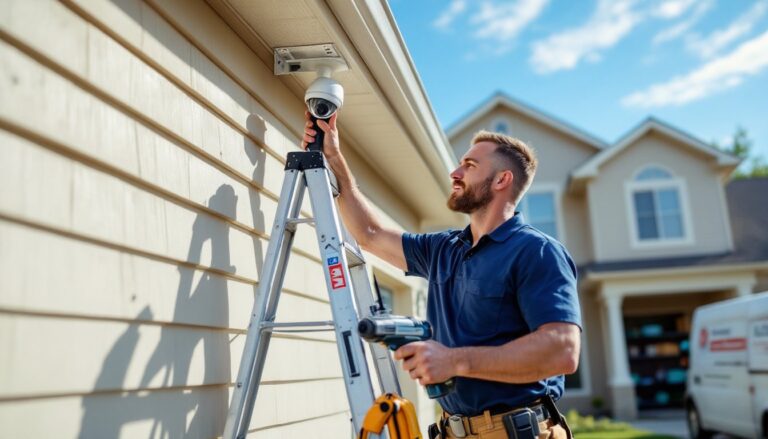
Mount cameras 7-9 feet high for optimal face capture without being easily tampered with. Use the included mounting template to mark screw holes, eyeballing it leads to crooked cameras that’ll bug you every time you pull into the driveway. For masonry or brick, use #8 concrete anchors instead of the provided drywall screws.
Angle the camera downward 15-20 degrees to balance ground coverage with facial detail. Too steep and you’ll record the tops of heads. Too shallow and faces disappear under hat brims. The Logitech app shows a live preview during setup, adjust before tightening the final mounting screws.
Battery-powered Circle 2 units simplify home security cameras installation, but charge fully before mounting. The magnetic base snaps onto mounts without tools, though a small Phillips screwdriver secures the mount plate to walls. Recharging requires removing the entire camera, so place units where a ladder or step stool reaches easily.
Integrating Logitech Cameras with Your Smart Home Ecosystem
HomeKit Secure Video stores up to 10 days of footage via iCloud+ (200GB plan minimum, currently $2.99/month). The feature encrypts recordings end-to-end, even Apple can’t access footage without user credentials. Set up through the Home app by adding cameras as accessories and enabling recording in settings.
Circle 2 pairs with Alexa via the Logitech Circle skill. Enable the skill in the Alexa app, link accounts, then use voice commands to show feeds on Echo Show devices. Activity-based routines work too, trigger lights when motion detected, for example. Similar process applies for Google Assistant through the Google Home app.
Many homeowners benefit from comparing features across multiple platforms, and resources like CNET provide detailed smart home ecosystem comparisons. Integration complexity increases when mixing brands, Logitech plays reasonably well with others but expect quirks when chaining automations across platforms.
Automation examples include turning on porch lights when cameras detect motion after sunset, sending push notifications to specific household members based on time of day, or recording clips to network-attached storage (NAS) for long-term archiving. Circle 2 supports IFTTT for custom triggers, though Logitech phased out some third-party integrations over time.
For renters or those testing security camera discounts before committing to permanent systems, battery-powered units avoid lease violations about drilling holes. Magnetic mounts leave minimal marks and remove cleanly when moving out.
Common Troubleshooting Issues and How to Fix Them
Offline cameras usually stem from router issues, not hardware failure. Reboot the router and camera, unplug both for 30 seconds, then power up the router first. Wait two minutes before plugging the camera back in. If still offline, check for firmware updates in the Logitech Circle or Home app. Outdated firmware causes compatibility issues with updated routers.
Choppy or laggy video points to insufficient bandwidth. Each 1080p stream uses roughly 2 Mbps upload speed. Multiple cameras plus kids streaming videos and video calls saturate typical 10-15 Mbps upload tiers from ISPs. Upgrade internet plans or enable lower resolution modes (720p uses about 1 Mbps) in camera settings.
False motion alerts plague cameras aimed at trees, flags, or busy streets. Redraw activity zones to exclude problem areas. Lower sensitivity settings in small increments, too low and you’ll miss actual events. The algorithm improves after a week of flagging false positives through the app.
Battery drain on Circle 2 accelerates in cold weather and with frequent live viewing. Expect 50% shorter runtime below 32°F. Reduce recording length from 60 seconds to 30 seconds per trigger, disable time-lapse mode, and narrow activity zones to extend charge cycles. Keep a second battery charged for quick swaps during winter.
Night vision washout happens when cameras face reflective surfaces like windows or white siding within 3-4 feet. IR light bounces back, whiting out the image. Reposition cameras or angle away from reflective materials. For monitoring through windows, disable IR and add external lighting, IR doesn’t pass through glass effectively.
For persistent issues, tested recommendations from Good Housekeeping and similar sources confirm that factory resets solve about 60% of unexplained problems. Press and hold the setup button for 15 seconds until LEDs flash, then re-add the camera through the app. This wipes custom settings, so screenshot configurations before resetting.
Conclusion
Logitech security cameras deliver solid performance for homeowners invested in smart home ecosystems, particularly Apple’s HomeKit. While the Circle View limits platform flexibility, its privacy-first approach and local storage appeal to those wary of cloud-only systems. Circle 2’s modular design suits renters and multi-platform households. Neither model breaks new ground in 2026, but both handle core security tasks without subscription traps or installation headaches that require professional help.